We are going to do a quick lesson on Study Island, and then learn about LAYERS for Paint.net.
7th Grade:
4. Algebra (Standard M7A)
a. Algebraic Expressions - lesson
6th Grade:
5. Algebra (Standard M6A)
a. Ratios - lesson

Wednesday, September 29, 2010

Excel Exercises
Type in the following spreadsheet, and format it to look like the sample below.
Instructions
1) Type in all text and numbers shown in the spreadsheet below.
2) Format all numbers as a currency.
3) Center the spreadsheet heading 'Sales for the Month' across the spreadsheet.
4) Format all text as displayed in the sample below.
5) Create formula's to display a total for each sales rep.
6) Create formula's to display a total for each product.
7) Create a formula to calculate the total sales for all sales rep's for the month.
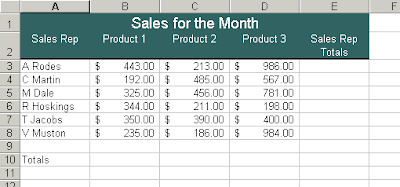
Basic Spreadsheet Concepts Exercise 1
Instructions
1) Type in all text and numbers shown in the spreadsheet below.
2) Format all numbers as a currency.
3) Center the spreadsheet heading 'Sales for the Month' across the spreadsheet.
4) Format all text as displayed in the sample below.
5) Create formula's to display a total for each sales rep.
6) Create formula's to display a total for each product.
7) Create a formula to calculate the total sales for all sales rep's for the month.

Basic Spreadsheet Concepts Exercise 1
Tuesday, September 28, 2010
8th Grade Excel Practice
Let's see if we can use a spreadsheet to calculate our averages in our math class.
Remember: Summative (70%)
Formative (30%)
Pay close attention to the hints I am about to give you. Work together to formulate the solutions!
Remember: Summative (70%)
Formative (30%)
Pay close attention to the hints I am about to give you. Work together to formulate the solutions!
Monday, September 27, 2010
Simple Excel Exercise, Typing Pal, & Drawing Software
8TH GRADE: Click here to access a simple exercise using Microsoft Excel.
6TH & 7TH: Let's take a portion of class to explore a drawing software program called PAINT.NET. Click here for some information about this.
6TH & 7TH: Let's take a portion of class to explore a drawing software program called PAINT.NET. Click here for some information about this.
Thursday, September 23, 2010
Software Review & Finish Typing Pal Exercises
Let's start off today with a review of four of the major types of software that we use in school. Hopefully, you have already, or you will use all of these before you leave my class.
Internet Browser
Word Processing
Presentation
Spreadsheet
You will be able to access definitions to all of these from the class website "Vocabulary" section.
Internet Browser
Word Processing
Presentation
Spreadsheet
You will be able to access definitions to all of these from the class website "Vocabulary" section.
Wednesday, September 22, 2010
What Is A Spreadsheet?
A spreadsheet, also known as a worksheet, contains rows and columns and is used to record and compare numerical or financial data. Originally, spreadsheets only existed in paper format, but now they are most likely created and maintained through a software program that displays the numerical information in rows and columns.
Microsoft: Excel
Mac: Numbers
Microsoft: Excel
Mac: Numbers
Monday, September 20, 2010
Learn By Playing: Video Games In The Classroom
-Video Games In The Classroom Article
-Technology Article Summary Due Today
-More TypingPal Lessons Added
-Technology Article Summary Due Today
-More TypingPal Lessons Added
Monday, September 13, 2010
Typing Pal Accounts Are Working!
I have Typing Pal accounts set-up for all students now! Take a look at the new poll on the right side of this screen, and choose your favorite sports team. Then, click here to log into Typing Pal with your very own account!
Log In Using:
ID # (123 456 7890)
ID # pw (123 456 7890 pw)
Log In Using:
ID # (123 456 7890)
ID # pw (123 456 7890 pw)
Friday, September 10, 2010
Technology Literacy Sample Test
Today, I want to start by taking a practice Technology Literacy Test. With a partner, write down the answers to the questions listed HERE.
Wednesday, September 8, 2010
BCS Class Contract
I understand that it is my responsibility to do the following during the first 5 minutes of class:
1) Log onto my computer using my student I.D. number.
2) Open two internet browser windows to the following websites.
-gmsbcs.blogspot.com
-PowerSchool student account (check all class grades)
3)Turn off the sound on my computer.
After 5 minutes, I will be ready to listen silently and start the assignment for the day. I will also follow the procedures listed below at all times during this class.
1) I know how to access the standards for MSBCS on the class website.
2) I will be able to access PowerSchool and show my grades at all times.
3) I will never access other areas of the computer until the assignment is finished.
4) I will never access inappropriate content on the computer.
5) I will never access other areas of the computer if I am failing an academic class.
6) If I am failing an academic class, I will utilize Study Island for that subject
upon completion of the day’s assignment.
7) I will remain seated unless I have permission to be out of my seat.
8) I will talk quietly when talking is allowed.
1) Log onto my computer using my student I.D. number.
2) Open two internet browser windows to the following websites.
-gmsbcs.blogspot.com
-PowerSchool student account (check all class grades)
3)Turn off the sound on my computer.
After 5 minutes, I will be ready to listen silently and start the assignment for the day. I will also follow the procedures listed below at all times during this class.
1) I know how to access the standards for MSBCS on the class website.
2) I will be able to access PowerSchool and show my grades at all times.
3) I will never access other areas of the computer until the assignment is finished.
4) I will never access inappropriate content on the computer.
5) I will never access other areas of the computer if I am failing an academic class.
6) If I am failing an academic class, I will utilize Study Island for that subject
upon completion of the day’s assignment.
7) I will remain seated unless I have permission to be out of my seat.
8) I will talk quietly when talking is allowed.
Tuesday, September 7, 2010
Touch Typing WPM Pre-Test
Today we are going to get an estimated Words Per Minute (WPM) count. Please go to the following website when prompted, and wait for further instruction on how to complete the test.
CLICK HERE FOR THE TEST
CLICK HERE FOR THE TEST
Monday, August 30, 2010
8th: Presentation Project / 6th & 7th: Touch Typing
8th Grade
Get together with your groups for our presentation projects.
-Organize
-Introduction
-Body
-Conclusion
6th Grade & 7th Grade
-Let's get down to some specifics on how to effectively use TypingPal!
This is a great program to teach touch typing if you use it properly.
Get together with your groups for our presentation projects.
-Organize
-Introduction
-Body
-Conclusion
6th Grade & 7th Grade
-Let's get down to some specifics on how to effectively use TypingPal!
This is a great program to teach touch typing if you use it properly.
Thursday, August 26, 2010
What Is Presentation Software?
8TH GRADE
-Let's discuss the meaning of presentation software.
*any software program for creating graphic presentations with visual aids, handouts, slides, etc.
-Let's begin to form our groups for a group project using presentation software.
6TH & 7TH GRADE
- Let's go in depth on how to use PowerSchool as a resource.
- Let's explore Typing Pal
Log in using: student / student
-Let's discuss the meaning of presentation software.
*any software program for creating graphic presentations with visual aids, handouts, slides, etc.
-Let's begin to form our groups for a group project using presentation software.
6TH & 7TH GRADE
- Let's go in depth on how to use PowerSchool as a resource.
- Let's explore Typing Pal
Log in using: student / student
Tuesday, August 24, 2010
Resumes Due --- Study Island Pre-Tests Due
Please make sure you have your completed resume open on your desktop.
Please make sure you are logged into www.STUDYISLAND.com.
8th Graders:PRESENTATION SOFTWARE
WINDOWS USERS: Open Microsoft Powerpoint = Start-All Programs-Microsoft Office-MS Powerpoint
MAC USERS: Use the search feature to look for KEYNOTE.
Please spend 15-20 minutes exploring this Presentation Software.
7th & 6th Graders:
Let's Explore Typing Pal!
-to log in use
click here for TYPING PAL
Please make sure you are logged into www.STUDYISLAND.com.
8th Graders:PRESENTATION SOFTWARE
WINDOWS USERS: Open Microsoft Powerpoint = Start-All Programs-Microsoft Office-MS Powerpoint
MAC USERS: Use the search feature to look for KEYNOTE.
Please spend 15-20 minutes exploring this Presentation Software.
7th & 6th Graders:
Let's Explore Typing Pal!
-to log in use
click here for TYPING PAL
Monday, August 23, 2010

Subscribe to:
Posts (Atom)